ITS QuickSupport
ITS QuickSupport is a tool used by the ITS Support Center to provide remote computer assistance in support of the Help Desk and Standard Desktop Support services. TeamViewer is the name of the software we are using to provide QuickSupport.
To Receive Assistance with QuickSupport
QuickSupport should only be run when you are on the phone with ITS support staff. Do not run QuickSupport and allow remote control unless you are on the phone with a tech and understand what is being done via remote support.
1. Download the QuickSupport Software
 |
Windows QuickSupport Tool ITSQuickSupport.exe This download is a program file that you can double-click to run. |
|
Mac QuickSupport Tool for macOS 10.15+ |
2. Run QuickSupport
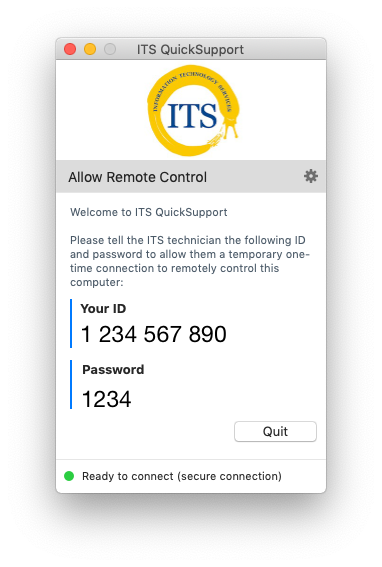
Save the downloaded file to your desktop and double-click on the ITS QuickSupport icon to start the software. Remote control is only possible when this application is running.
Note: Windows users may get a warning from your antivirus software when launching QuickSupport. You can safely ignore this message.
You will see a window with an ID and Password. The ID is specific to your computer. A new password is generated each time you launch the program.
3. Allow remote control by ITS technician
Provide the ID and password to the technician.
4. Quit QuickSupport
Close the QuickSupport application to terminate the remote control session. You can keep the software on your computer for future assistance, or delete it and re-download again if necessary.
Need Help?

Call: (831) 459-HELP (9-4357)
Email: help@ucsc.edu
